
Practical ways to make MySQL and Laravel queries run faster
Introduction
A slow application is very often a slow database, not slow code. As data grows, queries that once returned instantly can start taking seconds. Query optimization is the practice of restructuring how you ask for data – and how the database is set up – so it can answer faster, without changing what the query returns. This document walks through the most effective, practical techniques, with MySQL and Laravel examples.
Quick overview
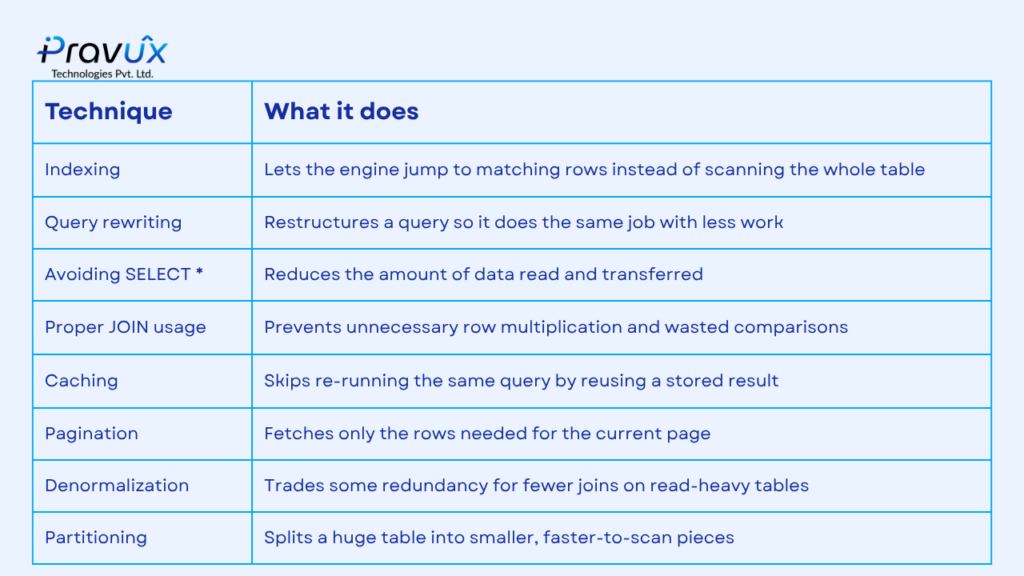
The table below summarizes the main techniques covered in this document.
1. Use EXPLAIN before optimizing anything
Before changing a query, find out what it’s actually doing. EXPLAIN shows whether MySQL is using an index, how many rows it expects to scan, and in what order tables are joined.
EXPLAIN SELECT * FROM orders WHERE customer_id = 42; Look for “ALL” in the type column – that means a full table scan. “ref”, “range”, or “const” generally mean an index is being used effectively.
2. Index the right columns
Indexes are the single biggest lever for read performance. Add them to columns used in WHERE, JOIN, ORDER BY, or GROUP BY – not to every column.
CREATE INDEX idx_customer_id ON orders(customer_id); In Laravel, this is a one-liner in a migration:
$table->index('customer_id'); 3. Avoid SELECT *
Fetching every column, even ones you don’t need, increases I/O and network transfer, and can prevent MySQL from using a covering index (an index that already contains all requested columns, avoiding a trip back to the table).
-- Avoid
SELECT * FROM users WHERE active = 1;

-- Prefer
SELECT id, name, email FROM users WHERE active = 1;
In Laravel’s query builder:
User::where('active', 1)->select('id', 'name', 'email')->get(); 4. Fix the N+1 query problem
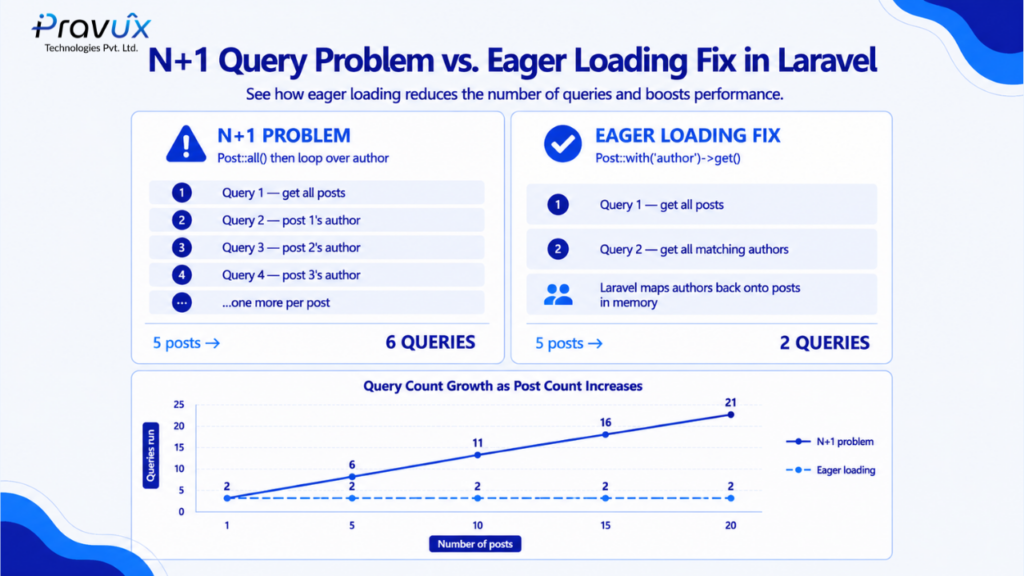
This is one of the most common performance killers in Laravel apps. It happens when you loop over a collection and each iteration triggers its own query to fetch related data – one query for the list, plus one more per row.
// N+1 problem: 1 query for posts + 1 query per post for author
$posts = Post::all();
foreach ($posts as $post) {
    echo $post->author->name;
}
Eager loading solves this by fetching related data in a single additional query, regardless of how many rows there are:
// Fixed: 2 queries total, no matter how many posts
$posts = Post::with('author')->get();
foreach ($posts as $post) {
    echo $post->author->name;
}
5. Use joins carefully
Joins are powerful but can multiply row counts unexpectedly, especially with one-to-many relationships. Only join tables you actually need data from, and make sure the join columns are indexed on both sides.
SELECT orders.id, customers.name
FROM orders
JOIN customers ON customers.id = orders.customer_id
WHERE orders.status = 'paid';
If you only need to check whether a related row exists, use EXISTS or Laravel’s whereHas instead of a join – it avoids duplicating rows.
Customer::whereHas('orders', function ($q) { $q->where('status', 'paid'); })->get();6. Paginate large result sets
Never load thousands of rows into memory when a user only sees 20 at a time. Use LIMIT and OFFSET, or better, keyset pagination for very large tables where OFFSET becomes slow.
SELECT * FROM products ORDER BY id LIMIT 20 OFFSET 40; Laravel makes this simple:
Product::orderBy('id')->paginate(20); 7. Cache expensive or repeated queries
If the same query runs often and the underlying data doesn’t change every second, cache the result instead of hitting the database each time.
$products = Cache::remember('top_products', 3600, function () {
    return Product::orderBy('sales', 'desc')->limit(10)->get();
});
8. Batch writes instead of looping
Inserting or updating rows one at a time in a loop means one round trip per row. Batching reduces that to a single statement.
// Avoid: many individual inserts
foreach ($items as $item) {
    DB::table('logs')->insert($item);
}

// Prefer: one batch insert
DB::table('logs')->insert($items);
9. Consider denormalization for read-heavy tables
Highly normalized schemas reduce redundancy but can require many joins to answer a single question. For reporting or read-heavy tables, storing a small amount of duplicated or precomputed data (like an order’s total, or a post’s comment count) can remove the need for expensive joins or aggregations at read time.
10. Partition very large tables
When a table grows into the tens of millions of rows, partitioning splits it into smaller physical segments (commonly by date range), so queries that target a specific range only scan the relevant partition instead of the whole table.
Common mistakes to avoid
- Adding an index to every column “just in case” – this slows down writes and wastes storage
- Using functions on indexed columns in WHERE clauses (e.g. WHERE YEAR(created_at) = 2026), which prevents the index from being used
- Ignoring N+1 queries because the app “feels fine” with small test data
- Optimizing without measuring first – always check EXPLAIN or query logs before and after a change
Conclusion
Query optimization is rarely about one big fix – it’s the accumulation of good habits: indexing the right columns, fetching only what you need, avoiding N+1 queries, and caching what doesn’t need to be recomputed every time. Measure with EXPLAIN, change one thing at a time, and re-measure. Over time, these small, deliberate choices are what keep an application fast as its data grows.