
A practical walkthrough of connecting Laravel to AI providers starting with free, five-minute approaches and working up to production-grade, paid architecture with queues, caching, and rate limiting.
FROM FREE & EASY → TO PAID & PRODUCTION-READY
AI features are becoming a default expectation in modern web apps – chatbots, content generators, smart search, and auto-summarizers all lean on the same basic idea: your Laravel backend sends a prompt to an AI provider over HTTP and gets a response back. The hard part isn’t the concept, it’s choosing the right level of complexity for where your project actually is. This guide walks through that journey in order: the fastest way to get something working today, then the incremental steps that turn a demo into something you’d trust in production.
1. Why “integration” means more than one thing
Calling an AI API from Laravel can be a single Http::post() call, or it can be a whole subsystem with queues, retries, streaming, and cost tracking. Both are valid, they just serve different stages of a project. Broadly, the approaches fall into three tiers:
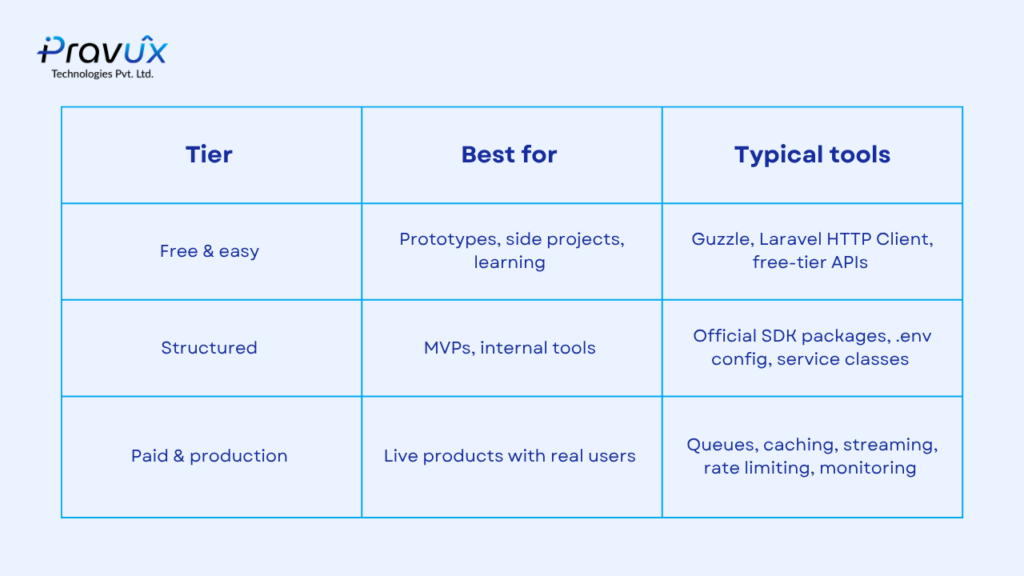
2. Free & easy: get something working today
TIER 1 . FREE
The fastest path to a working AI integration in Laravel doesn’t need a package at all — Laravel’s built-in Http facade (a wrapper around Guzzle) is enough to talk to almost any AI API.
2.1 Using free-tier providers
Hugging Face Inference API — free tier for many open-source models, no credit card needed for basic usage.
Google Gemini API — has a genuinely usable free tier for text and multimodal tasks.
OpenAI / Anthropic trial credits — useful for short-term testing, though they eventually require billing.
2.2 The minimal Laravel call
// routes/web.php or a controller method

use Illuminate\Http\Request;
use Illuminate\Support\Facades\Http;

Route::post('/ai/ask', function (Request $request) {
    $response = Http::withToken(config('services.huggingface.key'))
        ->post('https://api-inference.huggingface.co/models/gpt2', [
            'inputs' => $request->input('prompt'),
        ]);

    return $response->json();
});
Why this works well early on: no extra Composer packages, no abstraction layers — just Laravel’s native HTTP client. It’s the fastest way to confirm an API key works and a prompt returns something useful.
Popular AI providers you can wire into Laravel
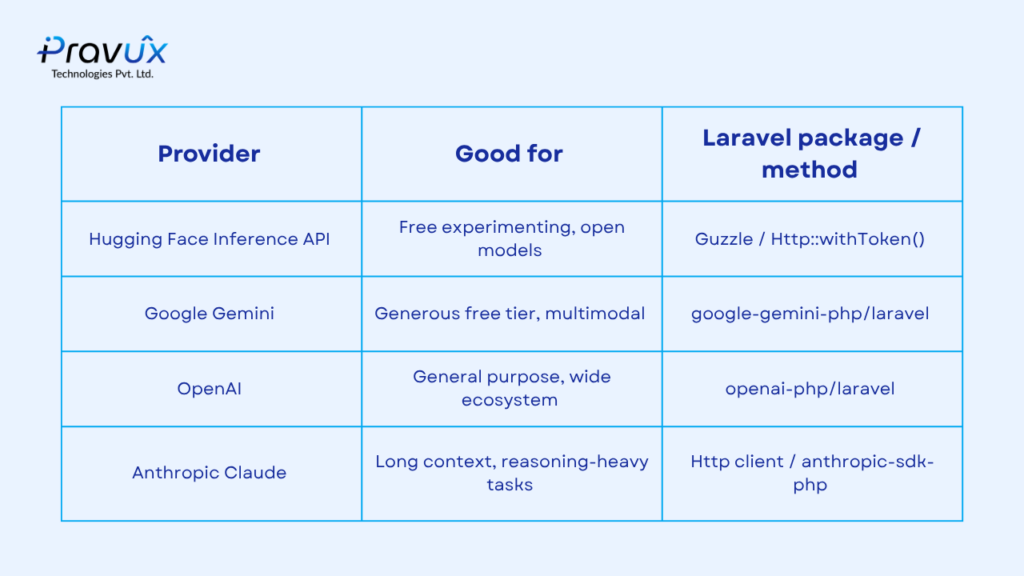 A few widely-used providers and the simplest way to reach each one from Laravel.
3. Structured: official SDKs and service classes
TIER 2 · STRUCTURED, STILL LOW COST
Once a prototype proves useful, raw Http::post() calls scattered across controllers get messy fast. The next step is wrapping the AI call in a dedicated service class and, where available, using an official SDK package instead of hand-rolling the request payload.
3.1 Install a package
composer require openai-php/laravel

php artisan vendor:publish --provider="OpenAI\Laravel\ServiceProvider"
3.2 Wrap it in a service class
<?php

namespace App\Services;

use OpenAI\Laravel\Facades\OpenAI;

class AiAssistantService
{
    public function ask(string $prompt): string
    {
        $result = OpenAI::chat()->create([
            'model' => 'gpt-4o-mini',
            'messages' => [
                [
                    'role' => 'user',
                    'content' => $prompt,
                ],
            ],
        ]);

        return $result->choices[0]->message->content;
    }
}
Now the controller stays thin, and swapping providers later (say, moving from OpenAI to Anthropic’s Claude) means changing one class instead of hunting through every route file.

4. Paid & production: queues, caching, and reliability
TIER 3. PRODUCTION-GRADE
AI API calls are slow (often 1–10 seconds) and can fail or get rate-limited. Making a user’s HTTP request wait on that round trip is a poor experience and a fragile architecture. Production integrations push the AI call into a background job.
Instead of blocking the request/response cycle, the AI call happens in a queued job: User Request → Controller → Dispatch Job → Queue → Worker → AI API Call (with retry / rate limiting) → Cache Result → Broadcast / DB Update.
4.1 Dispatch a job instead of calling inline
php artisan make:job AIRequestJob
<?php

use Illuminate\Bus\Queueable;
use Illuminate\Contracts\Queue\ShouldQueue;
use Illuminate\Foundation\Bus\Dispatchable;
use Illuminate\Queue\InteractsWithQueue;
use Illuminate\Queue\SerializesModels;

class AIRequestJob implements ShouldQueue
{
    use Dispatchable, InteractsWithQueue, Queueable, SerializesModels;

    public function __construct(
        public string $prompt,
        public int $userId
    ) {}

    public function handle(AiAssistantService $ai): void
    {
        $answer = $ai->ask($this->prompt);

        AiResponse::create([
            'user_id' => $this->userId,
            'prompt' => $this->prompt,
            'answer' => $answer,
        ]);

        broadcast(new AiResponseReady($this->userId));
    }
}
4.2 Cache repeated prompts
$answer = Cache::remember(
    'ai:' . md5($prompt),
    now()->addHours(6),
    fn () => $ai->ask($prompt)
);
4.3 Handle rate limits and retries gracefully
public $tries = 3;

public $backoff = [5, 15, 30];

public function handle(AiAssistantService $ai): void
{
    try {
        $answer = $ai->ask($this->prompt);

    } catch (\OpenAI\Exceptions\ErrorException $e) {

        if ($e->getErrorType() === 'rate_limit_error') {
            $this->release(30);

            return;
        }

        throw $e;
    }
}

4.4 Stream responses for a better UX
For chat-style features, streaming tokens back as they’re generated (rather than waiting for the full response) makes the app feel far more responsive. Laravel supports this with StreamedResponse, paired with the AI provider’s streaming endpoint.
return response()->stream(function () use ($prompt) {

    $stream = OpenAI::chat()->createStreamed([
        'model' => 'gpt-4o-mini',
        'messages' => [
            [
                'role' => 'user',
                'content' => $prompt,
            ],
        ],
    ]);

    foreach ($stream as $chunk) {
        echo $chunk->choices[0]->delta->content ?? '';

        ob_flush();
        flush();
    }
});
4.5 Track cost and usage
Paid APIs bill per token, so production systems typically log usage per request — either in a dedicated table or shipped to an observability tool — to catch runaway costs early and attribute spend to specific features or users.
5. Putting it together: the full picture
Progression: (1) Guzzle / HTTP Client → (2) Free-Tier Providers → (3) Official SDK → (4) Queues + Caching → (5) Production-Grade (rate limiting, retries, streaming, cost logging, fallbacks). Each step adds reliability and cost — pick the step that matches where your project actually is.
There’s no single “correct” way to integrate AI APIs with Laravel — the right approach depends on whether you’re validating an idea or shipping a feature to paying users. A reasonable path most projects follow:
1. Start with Http::post() and a free-tier provider to prove the idea works.
2. Move to an official SDK and a dedicated service class once the code needs to be reused.
3. Push AI calls into queued jobs the moment users start relying on the feature.
4. Add caching, retries, and streaming as usage and expectations grow.
5. Add cost tracking and rate limiting before scaling to production traffic.
